

 Region / Language
 Français
 Swedish
  Italy
Italy





 About Us
 Clientele
 Awards & Recognitions
 Careers
 Blog
Blog Guide
Guide
Yet again team Xamarin has taken its users by awe by announcing Xamarin.Android support for Android 9.0 (P) for both Visual Studio 2017 and Visual Studio for Mac.
For a better smoother functioning and application, The Preview version of Android 9.0(P) has introduced a list of features:
- Wi-Fi RTT (Round-Trip-Time)
- Display cutout support
- Notification enhancements
- Multi-camera support and many more
Available for both Visual Studio 2017 and Visual Studio for Mac, the Android 9.0(P) also comes with easy installation.
Here’s how you can install it and reap its benefits.
You can install the Android 9.0 (P) support in Xamarin.Android 9.0 and above from the Visual Studio Preview Channel and from the Visual Studio for Mac Beta Channel.
Visual Studio 2017
- Open the Visual Studio Installer, and download the latest Visual Studio 2017 Preview (15.8 Preview 5).
Visual Studio for Mac
- Switch the Visual Studio for Mac Update Channel to the Beta channel.
- Download Xamarin.Android 9.0.0.17 and install the update.
To install the Android P 9.0 SDK
Start the Android SDK Manager:
- Visual Studio 2017, use Tools > Android > Android SDK Manager
- Visual Studio for Mac, use Tools > SDK Manager
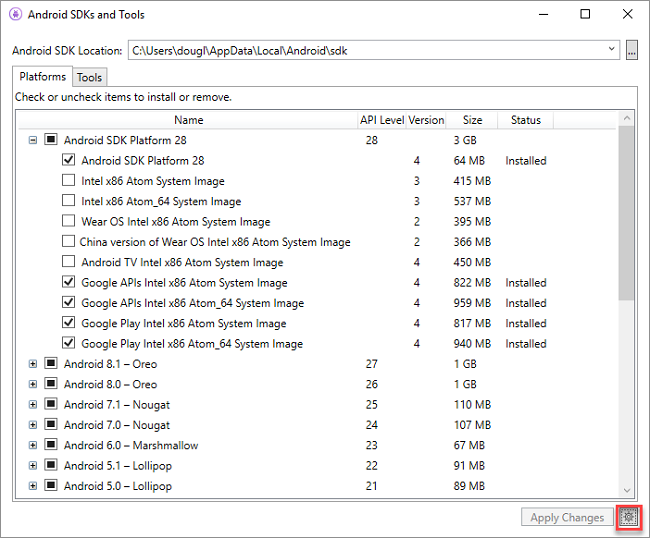
First, make sure you are using Google’s repository within the SDK Manager to do this, click on the Gear > Repository > Google:
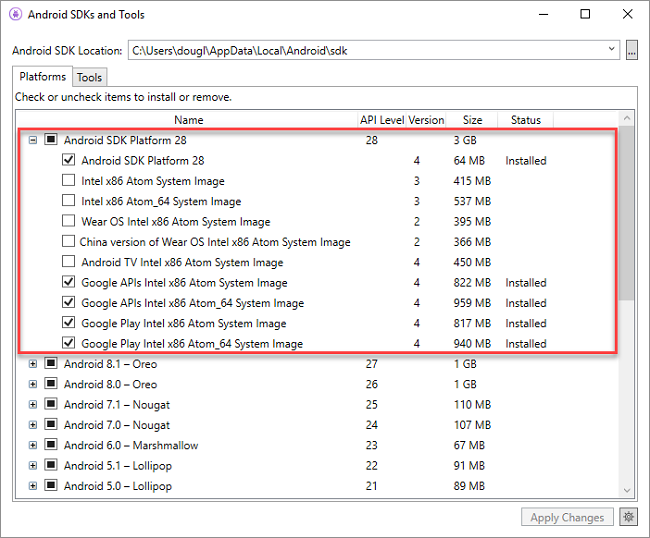
Install Android 9.0(API 28) SDKs and Device System Images:
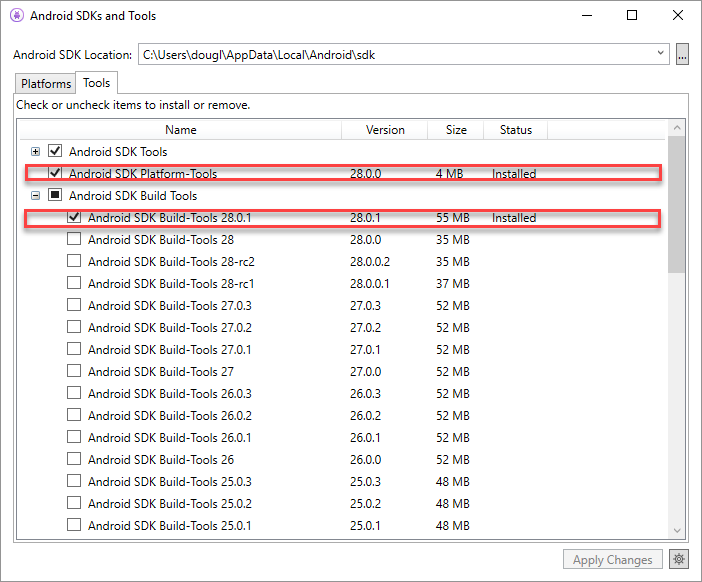
Install the latest Android SDK tools for API 28. This includes build-tools and platform-tools.
This forms the basic installation. However, if you wish to get a detailed information on getting started with Android (P), you can go through full documentation Here.
Well, the announcement unquestionably points towards Xamarin becoming one of the leading platforms. With more and more features being introduced every now and then, it is giving brands huge space for scope and improvement. Moreover, it is giving developers major development goals, pertaining to multiple platforms. So stay updated and lay your hands on Xamarin Development.